Ship the portfolio you keep meaning to make
Most portfolios never go live because they wait to be ready. Here is a way to put yours up in a weekend, with a template and what you already have.

Most people I know who make things have a portfolio they have been meaning to build for a year or more. Somewhere there is a folder with a half-finished layout, a list of projects to include and a note that says "redo the about bit". It never goes live, because it is never quite ready.
The trouble is rarely skill. A blank page asks you to decide everything at once: the layout, the type, how a project should look, what the about section should say. Each decision is small. Together they are enough to put it off for another month.
The short version
- A plain portfolio that is live does more for you than a perfect one that never leaves a folder.
- Start from what you have today: a few lines about you, three or four projects, a photo and a way to reach you.
- Pick one of three portfolio templates: Ellery for a personal site, free; Lola for a small studio; Elias Vane for a photographer.
- Give it one weekend, publish it, and improve it once it is out.
Start from what you already have
You do not need case studies to begin. A good personal site holds four things, and you probably have all of them today:
- A few lines about you. What you do, what you are curious about, where you are. Three sentences is plenty.
- Three or four projects. A name, one line on what it is, and a link. Not a write-up.
- A photo. Any clear one where you look like yourself.
- A way to reach you. An email address and the profiles you actually use.
If you write, bring that too. A short note you have already shared somewhere counts.
Let a template make the decisions
This is the part a template takes off your hands. There are three portfolio templates on Openfile, each made for a different kind of work. Pick the one that sounds like you and stop deciding.
Ellery, for a personal site
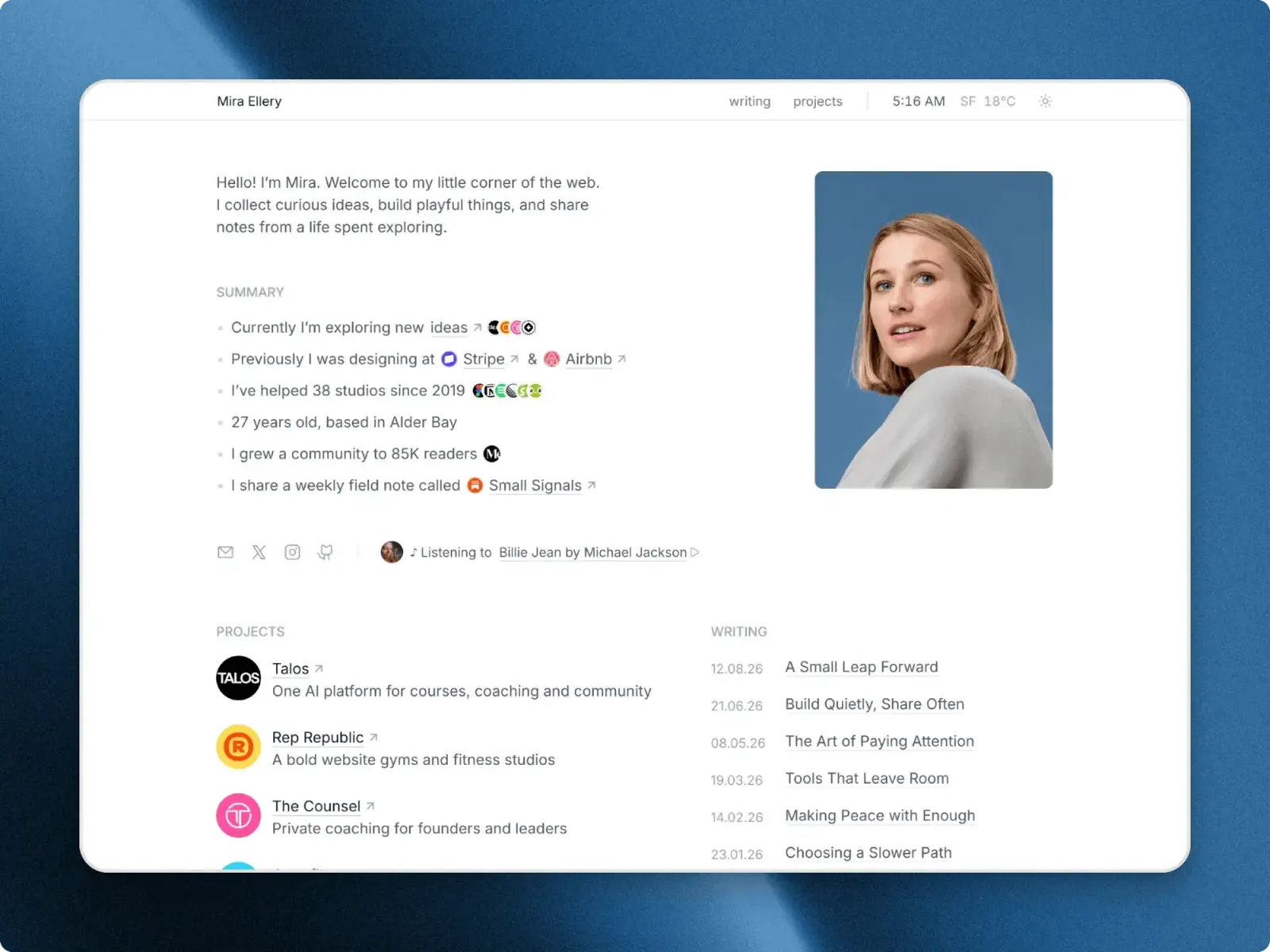
Ellery is one quiet page about you: a short intro beside your portrait, a six-line summary, your socials, then your projects and your writing side by side. Projects and posts live in the CMS, so adding one later is a new entry, not a new layout. Light and dark modes are built in, and the header carries a live clock and the temperature where you are. It is free: press Get it free on its page, leave your email address, and the remix link arrives.
Lola, for a small studio
Lola is for a design studio, or a freelancer who works like one. Each project gets a case study page on the CMS, with the brief, the idea and the outcome, and there is an about page with the team and an FAQ, a journal and a contact form. It is loud where it counts, one cherry red on paper and cream, and it starts at $49.
Elias Vane, for a photographer
Elias Vane is for a landscape or travel photographer who works in series rather than single frames. Each series has its own page with a gallery of captioned photographs, and around them sit a services page with rates for commissions and prints, a journal and a contact form. It starts at $49.
If you are not sure, start with Ellery. It is free, it asks for the least content, and you can move to a fuller site once you have more to show.
A weekend, not a month
Here is the order I would work in, so nothing gets done twice:
- Saturday morning. Replace the name, the photo and the about text. Leave the intro until last if that is the part you are stuck on.
- Saturday afternoon. Add your projects to the Projects collection. In Ellery each one is a name, a line and a link; in Lola and Elias Vane each has its own page, so start with your best three.
- Sunday. Add two or three posts if you have them, swap the remaining sample details for your own, and look at the phone layout.
- Sunday evening. Publish.
What to change first in a Framer template goes through that order in more detail, and checking breakpoints before you publish covers the last look at tablet and phone.
Publish it before it feels finished
A free Framer account publishes to a framer.website address, which is fine for a first version. Your own domain needs a paid Framer plan, and what a Framer website costs sets out the numbers.
Then send the link to someone. A live page you can improve is worth more than a better one that stays in a folder, and once it is out, adding a project takes a few minutes. You will find yourself doing it.
Questions people ask
Do I need case studies for a portfolio?
Not to start. A line on each project and a link to it tells a visitor what you have made. Write longer case studies later, for the two or three projects you most want to be hired for.
Which of the three portfolio templates is free?
Ellery. It comes with the free licence, which covers your own sites and client work: you leave your email address on its page and get the Framer remix link. Lola and Elias Vane are paid, with a Standard licence for one website and a Pro licence for unlimited websites.
Can I put my portfolio on my own domain?
Yes, with a paid Framer plan. On a free Framer account the site is published to a framer.website address, and you can connect your own domain whenever you are ready.