Best free Framer templates in 2026 (that are actually usable for a real site)
Most free templates are demos with a good home page. These eight have the pages, phone layouts and forms to launch a real site with, checked in October 2026.

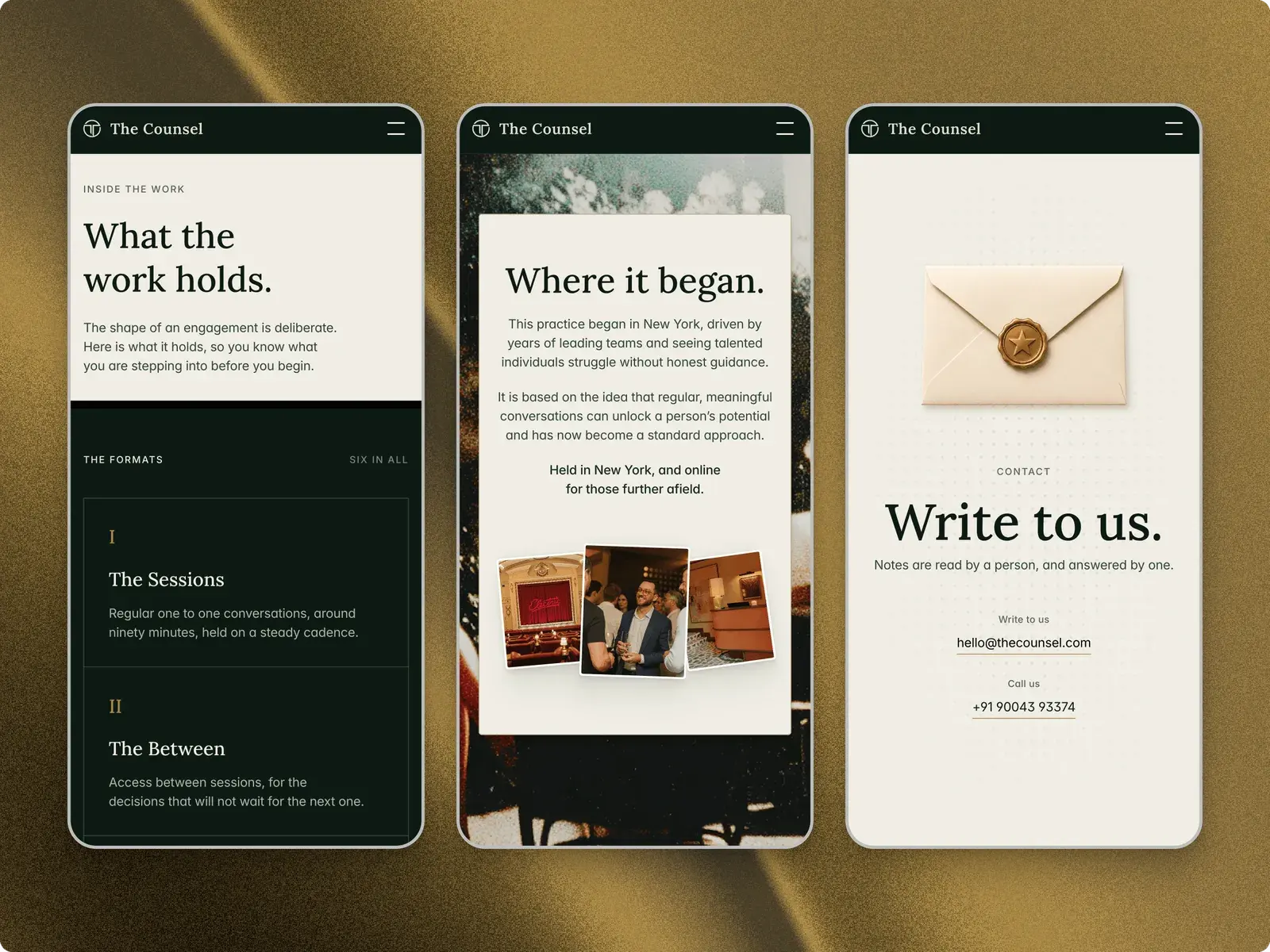
The best free Framer templates for a real site are the ones with the pages a business needs, not just a striking home page. For a startup with a product to show, Powder is the most complete free option I checked: 11 pages, with pricing, a changelog and a blog. Before launch, WaitlistOS does one page and an email field well, and for a coach or independent consultant, The Counsel has 10 pages and an enquiry form.
| Template | Best for | Price | Pages | CMS | Link |
|---|---|---|---|---|---|
| Powder | An AI or SaaS startup's first full site | Free | 11 | Blog | Get it |
| WaitlistOS | A waitlist before launch | Free | 1 | None | Get it |
| Overtake | A marketing or growth agency | Free | 10 | Case studies, blog | Get it |
| Consilioo | A consulting firm with several services | Free | 10 | Services, case studies, blog | Get it |
| The Counsel | A coach or independent consultant | Free | 10 | Journal | Get it |
| Mike Bennet | A brand or visual designer's portfolio | Free | 5 | Work | Get it |
| Tabfolio | UX and product design case studies | Free | 6 | Case studies | Get it |
| LinksPage | A link-in-bio or creator home page | Free | 6 | Projects, blog | Get it |
Checked October 2026.
The short version
- Startups: Powder once you have a product and a price, WaitlistOS before you launch. Both are free.
- Services: Overtake for an agency, Consilioo for a consulting firm, The Counsel for a coach or independent consultant.
- Designers and creators: Mike Bennet for visual work, Tabfolio for UX case studies, LinksPage for a link-in-bio site.
- A free template on a Framer address costs $0. Your own domain needs Basic, $10 a month billed yearly, or Pro if the template has more than two CMS collections.
How I picked these
I went through the free templates on the Framer Marketplace, sorted by Best and by Recent, and opened around 30 listings. Every pick here I checked on its listing and in its live preview on 7 October 2026, at desktop and at phone width. Page counts include CMS detail pages and the 404, as I count my own.
- Built for the job. The pages and sections that kind of site needs.
- Phone layouts. A real phone layout, with no sideways scrolling at 375 pixels wide.
- CMS where it's needed. Articles, case studies or projects as entries, not hand-built pages.
- Easy to edit. Clear styles, and a guide where the template is unusual.
- Free without a catch. The free version has to be a whole site, not a teaser for a paid one.
- Recently maintained. Every pick was updated by its creator within six weeks of when I checked.
I make and sell Framer templates on Openfile, and some of mine are on this list. I've tried to be fair; the others are here because they're good.
Powder: best for an AI or SaaS startup's first full site
Powder is the free template I'd hand a startup that already has something to show. It has the pages a software site gets asked for (pricing, a changelog, a blog and a sign-up page) in a dark design that suits AI products. Nick Stepuk last updated it on 1 October 2026.
- Price: Free
- Pages: 11: home, about, pricing, changelog, blog, blog post, get started, terms, privacy, cookies and a 404
- CMS: Yes, the blog
- Notable sections: product showcase, integrations, pricing plans, testimonials, FAQ
Good
- Three legal pages and a changelog are already built, so launch day needs fewer new pages.
- The phone layout keeps the navigation visible and nothing scrolls sideways.
Watch out for
- Dark only. There is no light mode to switch to.
- The main pages share one title out of the box, so set a title and description for each page before you publish.
WaitlistOS: best for a waitlist before launch
WaitlistOS is one of mine. It is a single page with one job, collecting emails, with a signup in the hero and another at the end. If all you have so far is a promise, it is enough site.
- Price: Free
- Pages: 1
- CMS: None
- Notable sections: three-step explainer, capabilities, testimonials, FAQ, closing signup
Good
- Light and dark modes, with a toggle in the header.
- Two chances to sign up, for people who decide at the headline and people who read to the end.
Watch out for
- One page and no CMS, so there is nowhere to post updates or prices. Once people ask what it costs, you'll want a bigger site.
Overtake: best for a marketing or growth agency
Overtake is built around proof, which is what agency clients buy on. Results sit near the top, each case study leads with a number, and a blog shows how the team thinks. It is bright and colourful, and Salim from Webestica updated it on 8 September 2026.
- Price: Free
- Pages: 10: home, about, case studies, case study, blog, blog post, FAQs, contact, privacy and a 404
- CMS: Yes, case studies and the blog
- Notable sections: results, selected work, process, a side-by-side comparison, testimonials, contact form
Good
- A new client story is a new CMS entry, with its own page.
- Contact and FAQ pages are ready, so it can take enquiries on day one.
Watch out for
- The hero headline is nine separate H1 headings, one per word, for its animation. Search engines expect one, so consider rebuilding it as a single heading.
Consilioo: best for a consulting firm with several services
Consilioo suits a firm of several people more than a practice of one. Services, case studies and articles each have their own collection, so every service gets its own page, and the contact page has a form. It sat second on the Marketplace's Best sort of free templates when I checked.
- Price: Free
- Pages: 10: home, about, services, service, case studies, case study, blog, blog post, contact and a 404
- CMS: Yes, services, case studies and the blog
- Notable sections: services grid, principles, results, a step-by-step framework, FAQ
Good
- A page for each service, each with its own title, so every service can be found on its own in search.
- Updated on 3 October 2026, four days before I checked.
Watch out for
- It has three CMS collections, one more than Framer's Basic plan allows. Your own domain means Pro, at $30 a month billed yearly, unless you turn one collection into ordinary pages.
The Counsel: best for a coach or independent consultant
The Counsel is my other free template, made for a coach, consultant or small practice whose work runs on trust. It is calm and editorial, with an approach page, a page on what an engagement holds and a multi-part enquiry form. If you are a firm with a list of services, Consilioo fits better.
- Price: Free
- Pages: 10: home, approach, inside the work, programmes, request a conversation, contact, journal, journal article, privacy and a 404
- CMS: Yes, the journal
- Notable sections: origin story and team, programmes, enquiry form, journal
Good
- Each page already has its own title and description, plus structured data for Organization, Service and FAQ.
- The enquiry form asks its questions in parts and sends each request to your email, with a honeypot against spam.
Watch out for
- No booking calendar. Enquiries arrive by email, so add Cal.com or Calendly yourself if clients book straight in.
- Light only, and the forest and gold palette is distinctive, so a full rebrand means working through its 10 colour styles.
Mike Bennet: best for a brand or visual designer's portfolio
Mike Bennet is a portfolio for designers whose work is mostly pictures. Each project picks its own gallery layout (grid, mosaic or stacked), so a project with four images and one with thirty both look finished. Lazar Filipović updated it on the day I checked.
- Price: Free
- Pages: 5: home, work, project, about and a 404
- CMS: Yes, the projects
- Notable sections: name-led hero, project list, why work with me, experience, CV download
Good
- A step-by-step video guide, and the creator's own email address for help.
- It reflows cleanly on a phone, with no sideways scrolling.
Watch out for
- Only five pages and no contact form: enquiries go to an email link or a Calendly link.
- Dark only, set in lower case, so changing either changes the character of the whole site.
Tabfolio: best for UX and product design case studies
Tabfolio is for designers whose work needs explaining, not just showing. Case studies run on the CMS with up to six sections each that you can rename or hide, and there is a CV page and a page for side experiments. It sat third on the Best sort of free templates when I checked.
- Price: Free
- Pages: 6: home, experiments, about, CV, case study and a 404
- CMS: Yes, the case studies
- Notable sections: animated background, case study list, CV, experiments, a template guide
Good
- Adding a case study is a new entry, so the layout never has to be touched.
- A short home page that gets to the work quickly on a phone.
Watch out for
- Dark mode, fully custom case studies and extra components are in Tabfolio Pro, a separate $69 template.
- No contact form: an email address and a Cal.com link.
LinksPage: best for a link-in-bio or creator home page
LinksPage turns a link in bio into a small personal site. Cards for links, events and images sit beside projects and posts from the CMS, and there is a newsletter signup. Its creator, Sasha Mozdir, says it works on Framer's Basic plan.
- Price: Free
- Pages: 6: home, projects, project, blog, article and a 404
- CMS: Yes, projects and the blog
- Notable sections: link, event and image cards, a book-a-call card, newsletter signup, featured posts
Good
- Mixes cards you place by hand with CMS entries, and a Featured switch puts a post on the home page.
- Laid out for phones first, which is where a bio link gets tapped.
Watch out for
- Dark only, and no contact form: the book-a-call card links out to a scheduling page.
Free template vs paid: what you usually give up
Less on looks than you might think, and more on depth and help. Here are the eight above next to my own paid templates.
| The free templates here | Openfile's paid templates | |
|---|---|---|
| Pages | 1 to 11 | 5 to 15 |
| CMS collections | None to three | One to four |
| Support | Up to the creator: some answer email, some promise nothing | Email support on most, and priority support with Talos Pro |
| Updates | A remix is your own copy, so later versions don't reach it | The same: a remix is a copy either way |
| Licence | Framer's Community Terms: your own and client sites, no reselling | Standard covers one website, Pro covers unlimited websites |
| Price | $0 | $49 to $159, paid once |
Depth is the real gap. A paid template tends to carry the pages a business adds later, like Talos's six product pages and pricing comparison table. Adding a whole kind of page to a free template is real work.
Licences matter most for freelancers. Every free template on the Marketplace comes under Framer's Community Terms, which allow commercial and client sites. Paid licences are set by each creator, so read one before you build a client's site on it.
A free template on a free Framer address costs nothing, with a Made in Framer badge. Your own domain needs a paid Framer plan: Basic is $10 a month billed yearly, or $15 monthly, as I checked on Framer's pricing page on 7 October 2026. Basic allows two CMS collections, so Consilioo needs Pro. How much does a Framer website cost works through the sums.
How to choose
Start from what a visitor should do when they arrive, then match the template to it.
- You haven't launched. WaitlistOS, and nothing more until people ask about price.
- You have a product and a price. Powder. If it has several products or plans, look at the paid SaaS templates.
- You sell a service as a team. Overtake for an agency, Consilioo for a consultancy.
- You sell your own time. The Counsel.
- You're a designer. Mike Bennet if the work is visual, Tabfolio if it needs a process told.
- You want one link for everything. LinksPage.
For a trades business or a gym, I didn't find a free template I'd launch with as it is; my local business templates are paid. Choosing a Framer template by the job goes deeper, and Openfile's free ones are all under free templates.
What to change first
- Styles before pages. Set your colours and fonts in the shared styles, and every page follows.
- The first screen. Rewrite the headline, the line under it and the main button for your own customer.
- Page titles. Give every page its own title and description in its settings, since several templates here ship with one title on every main page.
- Forms. Connect each form to your inbox or email tool, then send a test from your phone.
What to change first when you remix a Framer template has the full order, from styles to the domain.
Questions people ask
Can I use a free Framer template for client work?
Yes, for every template here. Free templates on the Framer Marketplace come under Framer's Community Terms, which allow your own sites, commercial ones included, and client work where the template becomes part of the client's site. You can't sell, share or repost the template itself, and the same terms cover Openfile's two free templates.
Are free Framer templates good for SEO?
They can be. Framer builds the sitemap and lets you set a title and description for every page on any template, free or paid. The catch is that most of the free templates I checked use one title on every main page, so set your own before you publish.
Can I publish a free template on my own domain?
Yes, but not on Framer's Free plan, which publishes to a Framer address. A custom domain needs Basic, at $10 a month billed yearly or $15 monthly, or Pro at $30 billed yearly if the template has more than two CMS collections. The template itself stays free.
Do free templates get updates?
Your site doesn't change when a creator updates their template, because a remix is a separate copy of the project. The Marketplace shows each template's last update date, which tells you whether it is looked after. To use a newer version, you remix it again and move your content across.
How do I remix a free template?
On the Framer Marketplace, open the template and choose Remix for Free, and Framer copies it into your workspace; you need a free Framer account. For WaitlistOS and The Counsel, leave your email on the template page and the remix link is sent to you.