
Openfile
EN

Pinmat

  • Latest

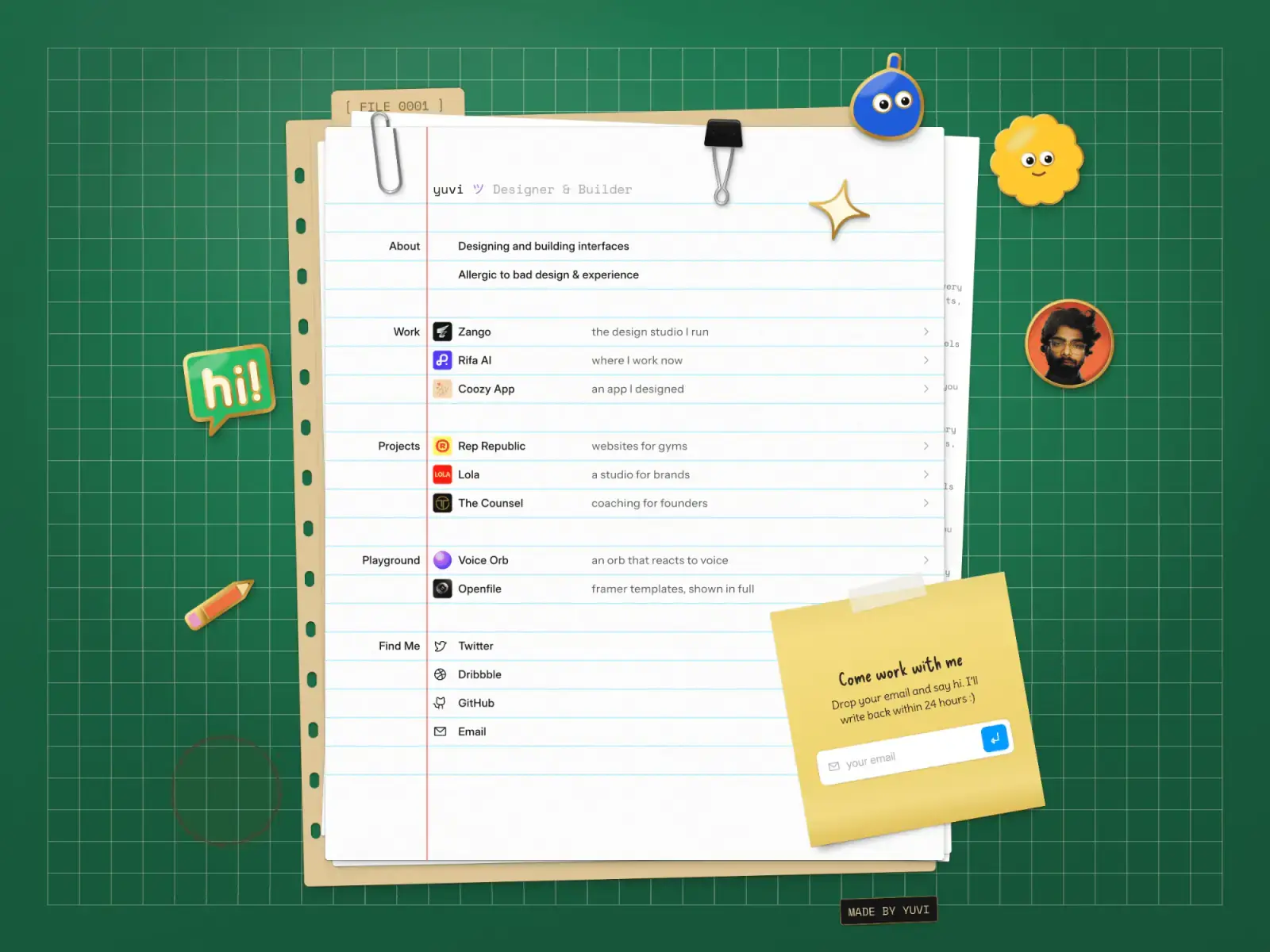
A one-page portfolio laid out as a desk: a notebook sheet, a sticky note and enamel pins visitors can move.

About Pinmat

Your work on one notebook sheet, with pins people want to move.

Pinmat is a free Framer portfolio for a designer or builder, laid out as a desk: a ruled notebook sheet on a green cutting mat, with a sticky note for messages and enamel pins visitors can drag. Its 2 pages are the one-page home and a 404, with every row on the CMS.

  • A desk that builds itself

    On load the folder slides onto the mat, the sheets glide out of it, the clips snap on, the sticky note is slapped down and the pins are pressed in one by one.

  • Pins that move and talk

    Six enamel pins with gold rims and a slow shine can be dragged anywhere. Each shows its own label-maker tip, such as "PSST. I MOVE.", and one is a photo pin for your portrait.

  • Rows from the CMS

    One Projects collection holds every row: a name, a one-line description, a logo, a link and its section, Work, Projects or Playground. A new entry is a new line on the sheet.

Made for

  • Product, UI and brand designers
  • Developers and design engineers with side projects
  • Students and job seekers who want a CV people remember

Best for

  • Designers who want a portfolio with personality
  • Developers with a few products and side projects
  • Students and job seekers making a CV people remember

Desktop, tablet and phone

The Pinmat home page at each breakpoint, captured from the published site. Each layout is set separately, not scaled down.

Desktop, 1440 pixels
Tablet, 810 pixels
Phone, 390 pixels

Everything in Pinmat

Pages are listed from the published site's own sitemap.

Pages

2
  • Home
  • 404

Built in

  • Draggable pinsSix enamel pins with a little inertia and a looping shine, one of them a photo pin
  • Enamel cursorAn arrow that turns into a pointing hand, with each pin's label-maker tip beside it
  • Load-inEvery object arrives as it would on a real desk, in about three seconds
  • Sticky note formA working email form on a note that flutters as if a fan were blowing on it
  • MatGridA code component that draws only whole cells and can clear a block, as on the 404
  • Reduced motionRespected site-wide

Design system

  • FontsSpace Mono, Inter Display, Instrument Sans
  • Palette#FCFBFC#1E6846#E2CA7E#D9D7CD#869A77
  • Colour styles17
  • Text styles12
  • BreakpointsDesktop, tablet and phone

With it

  • The templateA Framer remix link
  • UpdatesLifetime
  • Framer ProThree months on an annual plan when you publish

Good to know

  • The rows, logos, name and portrait are UV's own, shown as samples to replace. The Find Me rows all link to openfile.pro.
  • The share images and favicon carry the sample look, so replace them once you have made it yours.

CMS

  • Projects8 entries to start from

What the licence lets you do

Free

Free

  • Use it for your own sites, including commercial ones.
  • Use it for client work, as part of a site you build for them.
  • Change anything in it.
  • Sell, share or give away the template itself.
  • Post it on another marketplace or template site.
  • Use it to make templates or components that compete with it.
  • Present it as your own original work.

A plain summary. The binding text is Framer's Community Terms, and the licence page explains both. Read the licence

Before you buy

What do I get with Pinmat?

The whole site as a Framer project: 2 pages, 1 CMS collection, laid out for desktop, tablet and phone. Leave your email and the remix link is sent to it; Framer copies the site into your workspace.

How do I make it mine?
  1. Remix the template.
  2. Edit the rows in the Projects collection: the Section field decides the list, and logos look best as square tiles.
  3. Change the name and role in the sheet's header, and swap the photo pin's picture for your own.
  4. The pins, the sticky note and the section labels each have a phone copy and a larger-screen copy: change both.
  5. Point the sticky note's form at your own inbox and the Find Me rows at your profiles, then publish.
Do I need to write code?

No. Text, images, colours and CMS entries are all edited in place in the Framer editor.

Can I use it on more than one website?

The Free licence covers your own sites and client work. The licence page has the details.

What if I get stuck?

Write to support@openfile.pro. Replies come within 48 hours on weekdays, and setup questions and bugs in the template are covered.

Can visitors really move the Pinmat pins?

Yes. The six enamel pins can be dragged anywhere on the desk with a little inertia, grow slightly on hover and press, and catch a shine every eight to ten seconds. Each has its own label-maker tip beside the cursor, which hides while the pin is dragged. One is a photo pin for your portrait.

Does Pinmat work on phones?

Yes, at desktop, tablet and phone widths. On a phone the pins gather under the About rows and the sticky note sits below the list. Those are separate phone copies of the pins, the note and the section labels, so when you change one, change its larger-screen copy too.

Can I use the normal cursor in Pinmat?

Yes. The enamel cursor is set on each page's desktop breakpoint: remove it there and visitors see their own cursor. Links, rows, the note's button and the pins switch it to a pointing hand or a pin's tip.