


What a coach or consultant website needs
Before anyone books a call with a coach, they check a few things. Here are the pages that answer them, in the order people look.

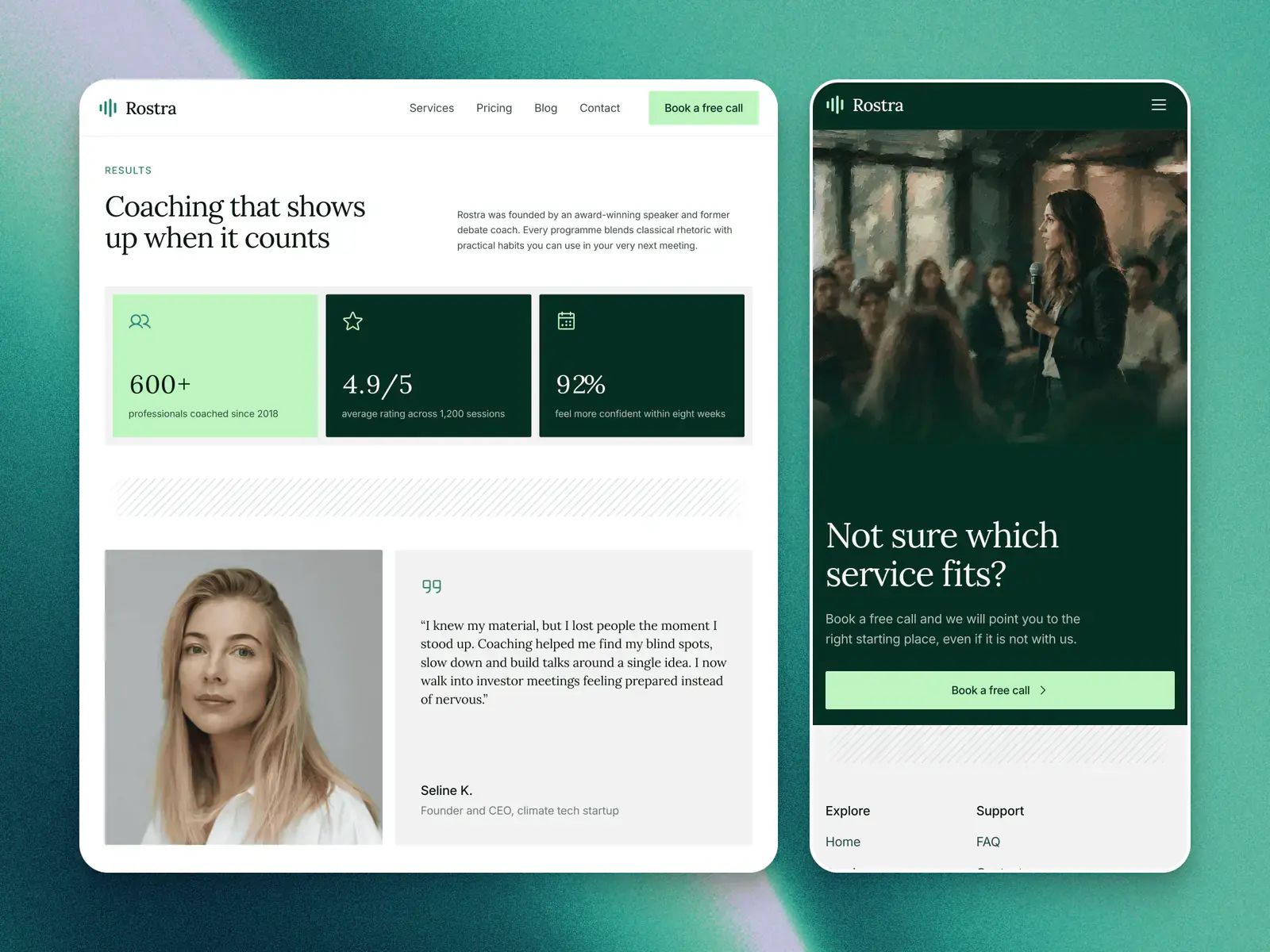
A coaching or consulting website needs to answer five things before someone books a call: who you help, why you are worth trusting, what working with you looks like and roughly costs, who it has worked for, and how to start. In practice that is a home page, an about page with your credentials, a page of services or programmes, results with named testimonials, and one clear way to book a first call.
A FAQ, a newsletter, a contact page and a privacy page come after those. Here is how I'd build one, using the three templates in Consulting as the examples: The Counsel, an editorial site for a private coaching practice, Rostra, for a public speaking coach, and Polaris, for an admissions consultancy.
The short version
- Answer in order: who you help, why you, what it costs, who it has worked for, and how to start.
- Give each programme a line on who it is for, and a from price or a plain note on how pricing works.
- Put results and testimonials under real names, and one way to book a first call on every page.
- A FAQ, a newsletter, contact details and a privacy page come next. A blog can wait.
What does a visitor check before booking a call?
People rarely hire a coach on the first visit. They come back, often after a referral, and look for the same things in roughly this order.
- Is this for someone like me? Say who you work with in the first screen. The Counsel's home page names founders and leaders who have outgrown advice, and Rostra's names presentations, pitches and keynotes.
- Why this person? Your background, your method and the people behind the practice.
- What do I get, and what does it cost? Each service or programme, who it suits and a price or a range.
- Has it worked for people like me? Results and testimonials with names and roles.
- How do I start? One next step, worded the same everywhere: book a call, or send a request.
Which pages does a coaching or consulting website need?
Here is each one, why it matters and where you will find it in the three templates.
| What it needs | Why | Where it is in The Counsel, Rostra, Polaris |
|---|---|---|
| A home page that names who you help | A visitor decides in seconds whether to read on | The Counsel: a Who it is for block with three marks. Rostra: six speaking moments. Polaris: STEM students aiming at funded Master's and PhD places |
| About, with credentials | Coaching is bought on trust in one person | The Counsel: an approach page with the origin story, four beliefs and a team of four. Rostra: the founder's background above the results. Polaris: a founder section with her PhD and review experience |
| Services or programmes, each with who it is for | People need to see which one is theirs | The Counsel: two programmes and an Inside the work page of six formats. Rostra: three services and three plans. Polaris: six services, a four-step process and three packages |
| A from price, or how pricing works | It settles the first worry before the call | Rostra: a pricing page with team workshops on quote. Polaris: three priced packages. The Counsel: none, so add a line |
| Results and named testimonials | Proof from someone like the reader | All three: a figures band and quotes. The Counsel and Polaris give full names, Rostra a first name and initial |
| A way to book a first call | It is the one thing the site has to make easy | Polaris: a live Cal.com calendar. Rostra: a free call through the contact form. The Counsel: a multi-part request form |
| A FAQ | It answers the doubts that stop a booking | Rostra: twelve on the CMS, on a page of their own. Polaris: nine on the home page. The Counsel: none, so add one |
| A newsletter or lead magnet | It keeps in touch with people not ready yet | The Counsel: a quarterly newsletter signup on the journal. Rostra and Polaris: a blog or journal, no signup |
| Contact and privacy | Some people would rather write, and your forms collect personal details | All three have a contact page. The Counsel has a privacy page, Rostra's is sample text, Polaris has none |
What should the home page and about page say?
The home page has one job: tell the right visitor they are in the right place, then show the way to a call. Name the people you help and the moment they are in, not your method. Rostra lists six moments, from pitches and keynotes to interviews and wedding toasts, each with a line on what you will work on. The Counsel does it with three short marks: you lead something real, you have outgrown advice, you value discretion.
The about page is where credentials go, in plain words a client can check: your qualifications, where you have worked, how long you have done this and how many people you have helped. Polaris puts the founder on the home page with her PhD, her time as an application reviewer and a Book a Call With Amara button beside them. The Counsel gives a whole page to the approach: why the practice exists, four beliefs, where it began and the team, each with a role.
How should services and prices be set out?
Give each service or programme a name, one line on who it is for, what is included and how long it runs. Polaris lists six services, each with three things it includes, then a four-step process from the free call to the final offer. Rostra's plans each open with a line on who they suit, such as preparing for one specific moment, or an intensive programme for leaders and big stages.
Should a coach show prices?
I'd show at least a from price. A visitor who cannot tell whether you cost a hundred or ten thousand often leaves rather than asks. Rostra shows three plans and a from price for team workshops with a quote button, and Polaris shows three packages with a note that instalments are possible. Where every engagement is priced to the client, say how pricing works instead: what it depends on, and that you give a figure after the first call.
The Counsel shows no prices at all. That suits a referral-led practice that screens every client, but it is the one gap I'd close if you use it: a single line on the programmes page saying how fees are set is enough.
Where do results and testimonials go?
Put them right after the services, where the reader is asking whether it works. A testimonial is worth more with a full name, a role and the result in one line. The Counsel pairs each quote with an outcome, such as twelve weeks from stuck to a clear plan, and Polaris gives each student's name, degree and university.
Every figure, name and quote in all three templates is sample content. Replace them with your own, with each client's permission, or take the section out until you have them. Never keep a sample number.
Should you use a booking calendar or a form?
A calendar suits a short free call you are happy to take with anyone. A form suits a practice that wants to know who is asking before it agrees to talk. The three templates show both.
- A calendar. Polaris ends its home page with a live Cal.com calendar for a free 20 minute call, and every booking button leads there. Cal.com publishes its own plugin on the Framer Marketplace: you paste an event type's booking URL and place the embed on the page. Framer's help pages list Calendly among its built-in form integrations too.
- A short form. Rostra's Book a free call leads to its contact form: name, email, what you need help with and a message, with three steps on what happens next.
- A longer request. The Counsel's form asks for name, email, city, role and company, what the person is leading, the programme, team size and who referred them, and says plainly that it is a request to talk, not a checkout.
Framer's own forms can send each submission to your email, a Google Sheet or a webhook. Whichever you choose, send a test to yourself before you publish.
What about the FAQ, newsletter, contact and privacy pages?
- FAQ. Answer the questions you hear on calls: who it is for, how sessions run, how long they last, how payment works. Rostra keeps twelve in its FAQs collection, grouped as Getting started, Sessions, and Pricing and payments.
- Newsletter or lead magnet. For people not ready to book. The Counsel's journal has a quarterly newsletter signup. Framer's Input component can send email signups to services such as Loops.so or Mailchimp, if you offer a short guide in exchange.
- Contact. An email, a phone number and where you work, in person or online. Polaris adds office hours and when you will reply.
- Privacy. Your forms collect names and emails, so say what you keep and why. Polaris has no privacy page, and Rostra's is sample text, so write your own.
What are the common mistakes on a coaching website?
- Hiding prices completely. Give a from price, or explain how pricing works.
- No clear next step. One button, one wording, on every page. Rostra's nav carries Book a free call, and Polaris's carries Book a Free Call.
- Generic stock photos. People hire the person, so use real photos of you and the team. Polaris's photographs are stock and Rostra's are a mix of Unsplash photos and AI paintings, all meant to be replaced.
- Testimonials without names. A quote signed by a client is easy to doubt. Use the full name and role where the client agrees.
- Talking about the method before the client. Lead with who you help and what changes for them.
Checklist before you publish
| Check | Done when |
|---|---|
| Who you help | Named in the first screen, in your clients' words |
| Credentials | Your background is on the about page in facts a client can check |
| Programmes | Each has who it is for, what is included and how long it runs |
| Prices | A from price, or a line on how pricing works |
| Proof | Every figure and testimonial is yours, with names. The samples are gone |
| Booking | The calendar shows your own event, or the form reaches your inbox |
| Next step | The same button and wording on every page |
| Photos | Real photos of you, not the template's |
| Privacy | A page of your own that says what the forms collect |
| Search | Each page has its own title and description |
What to change first in a Framer template covers the order to do this in.
Which template fits which practice?
The Counsel is free and suits a private coaching or advisory practice that works by enquiry and wants room to explain the work. Rostra, from $49, suits a coach who sells single sessions, monthly programmes and team workshops at set prices. Polaris, also free, suits a solo consultant who books a free call first and sells packages, and its results band is drawn for figures. Each keeps its structure if you are in another field: you rewrite the words. If none fits, choosing a template by the job helps you pick by what the site has to do.
Questions people ask
How many pages does a coach or consultant website need?
Five to ten. A home page, an about page, services or programmes, a contact or booking page and a privacy page are the core. Polaris does it in five pages, The Counsel and Rostra in ten, adding a FAQ, pricing or a journal.
Should I show prices on a coaching website?
I would show at least a from price. Where every engagement is priced to the client, say what the fee depends on and that you give a figure after the first call. Rostra and Polaris show their prices, and The Counsel shows none.
Do I need a blog on a coaching website?
Not to start. Your services, proof and booking come first. All three templates have a journal or blog on the CMS, so you can add articles later without building a new page.
Should I use Calendly, Cal.com or a form for the first call?
A calendar if you take a short free call with anyone, a form if you want to know who is asking first. Polaris has a live Cal.com calendar, and Rostra and The Counsel use forms. Framer lists Calendly among its form integrations, and Cal.com has its own Framer plugin.
Can I build a coaching website myself?
Yes. In Framer you edit text, pictures and colours on the canvas, and the journal and FAQ entries are CMS items you fill in like a form. The Counsel is free to start from. Your own domain needs a paid Framer site plan, from $10 a month billed yearly.