
Black Friday

40% off any template and All access

Until 4 December. The code goes on at checkout by itself, so the price you see is the price you pay.

Openfile
EN

Polaris

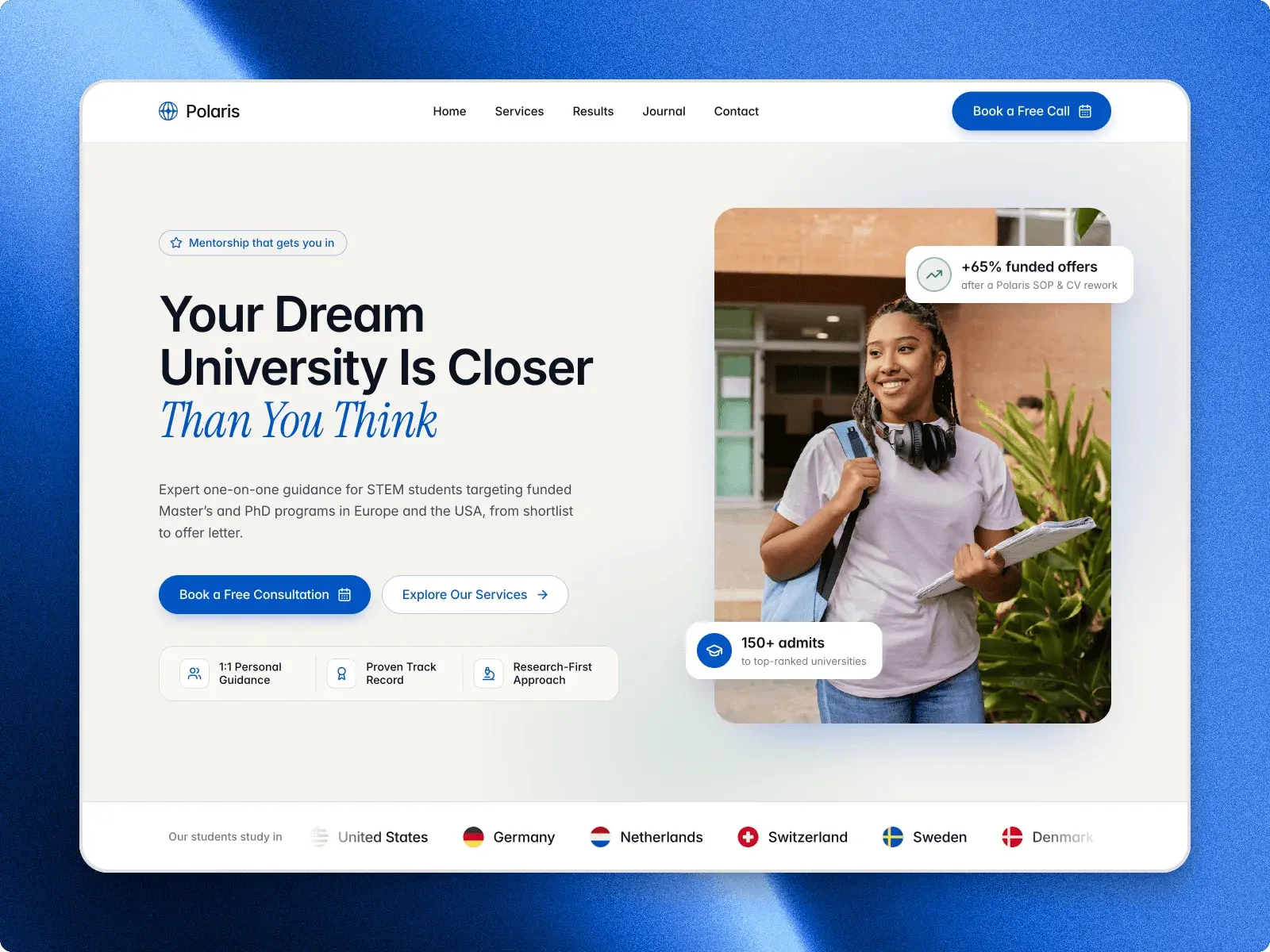
A site for an admissions consultancy that mentors students towards funded Master's and PhD places.

About Polaris

For mentors who take students from shortlist to offer letter.

Students and their parents choose a mentor on trust and results. Polaris shows both plainly, so the right students book a call with you.

  • Results people can see

    A navy results band draws the numbers: a dot grid of offers, an inbox of professor replies with the reply rate before and after, and a chart of admits by year.

  • Services and packages on one page

    Six services with what each includes, a four-step process from the first call to the final offer, and three priced packages, the middle one marked most popular.

  • Calls booked on the page

    A Cal.com calendar sits at the foot of the home page and every booking button leads to it. The contact form asks what the student is applying for, their field and the countries they have in mind.

Made for

  • Admissions and study-abroad consultants
  • Mentors for Master's and PhD applicants
  • Coaches who sell packages and book calls

Best for

  • Study-abroad and admissions consultants
  • PhD mentors who help with professor outreach and funding
  • Solo mentors who book a free call before they sell

Desktop, tablet and phone

The Polaris home page at each breakpoint, captured from the published site. Each layout is set separately, not scaled down.

Desktop, 1440 pixels
Tablet, 810 pixels
Phone, 390 pixels

Everything in Polaris

Pages are listed from the published site's own sitemap.

Pages

5
  • Home
  • Services
  • Contact
  • Journal
  • Journal postCMS

Built in

  • Results bandA dot grid, a professor inbox with a typing indicator and an admits chart, each with its own motion
  • BookingA live Cal.com calendar, with every booking button pointing to it
  • PackagesThree plans with prices and what each includes, on the services page
  • Student storiesA featured quote with a portrait, and a ticker of eight quote cards with photos
  • Reduced motionEntrances and loops follow the visitor's system setting

Design system

  • FontsInter, Instrument Serif
  • Palette#FFFFFF#101A2D#C9C8C7#8C8478#25518D
  • Colour styles35
  • BreakpointsDesktop, tablet and phone

With it

  • The templateA Framer remix link
  • UpdatesLifetime
  • Framer ProThree months on an annual plan when you publish

Good to know

  • Polaris Admissions and its founder, Dr. Amara Okafor, are stand-ins: the name, bio, photo, email, WhatsApp number and city are all to replace.
  • Every figure, testimonial, professor reply and price is a stand-in, and the photographs are stock.
  • The calendar shows Cal.com's public demo event and the social links go to openfile.pro, as samples. The four journal articles are sample text.

CMS

  • Journal4 entries to start from

What the licence lets you do

Free

Free

  • Use it for your own sites, including commercial ones.
  • Use it for client work, as part of a site you build for them.
  • Change anything in it.
  • Sell, share or give away the template itself.
  • Post it on another marketplace or template site.
  • Use it to make templates or components that compete with it.
  • Present it as your own original work.

A plain summary. The binding text is Framer's Community Terms, and the licence page explains both. Read the licence

Before you buy

What do I get with Polaris?

The whole site as a Framer project: 5 pages, 1 CMS collection, laid out for desktop, tablet and phone. Leave your email and the remix link is sent to it; Framer copies the site into your workspace.

How do I make it mine?
  1. Remix the template.
  2. Replace the name, logo, founder and contact details.
  3. Point the Cal.com calendar at your own event.
  4. Edit the services, packages and figures, and the Journal collection.
  5. Update page titles and meta descriptions, then publish.
Do I need to write code?

No. Text, images, colours and CMS entries are all edited in place in the Framer editor.

Can I use it on more than one website?

The Free licence covers your own sites and client work. The licence page has the details.

What if I get stuck?

Write to support@openfile.pro. Replies come within 48 hours on weekdays, and setup questions and bugs in the template are covered.

Can Polaris work for a consultancy outside admissions?

Yes. The sample copy is for admissions mentoring, but the structure is services with what each includes, a process, priced packages, a results band, the founder and a booking calendar. A career coach or another advisor keeps the structure and rewrites the words. The results cards are drawn for figures, so change the numbers and labels with them.

How does booking work in Polaris?

The home page ends with a live Cal.com calendar, and every booking button on the site leads to it. It shows Cal.com's public demo event, so point it at your own event before launch. Buttons that start an application, such as Start Your Sprint, go to the contact page instead.

What does the Polaris contact form ask?

A full name, an email, a phone or WhatsApp number, whether the student is applying for a Master's, a PhD or is not sure yet, their field of study, their target countries and how you can help. The send button has its own loading, success and error states.