


What a homebuilder website needs
A buyer of a new home looks at the price, the photographs and how to see it in person. Here are the pages that answer those, in the order people look.

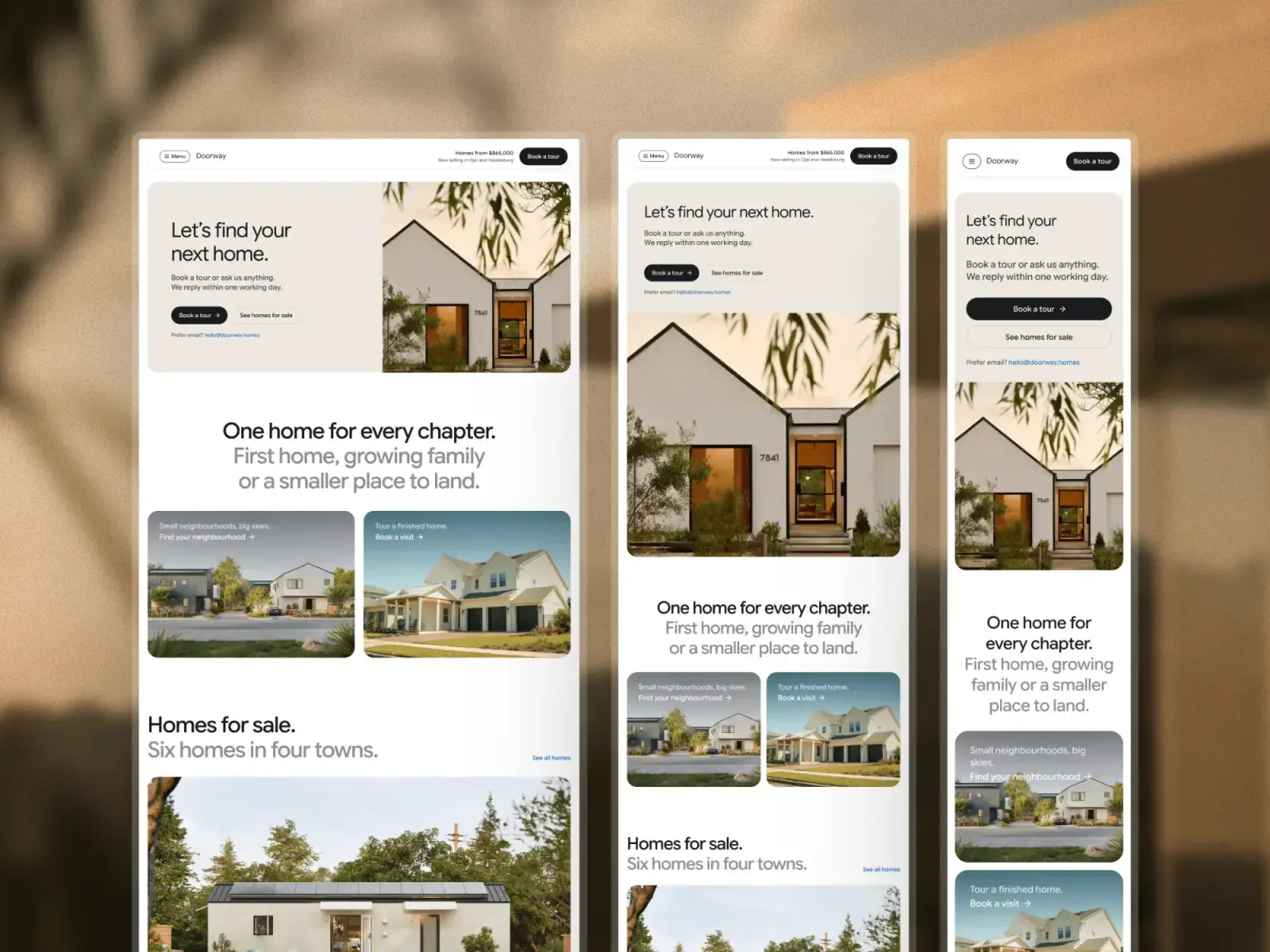
A website for a homebuilder or new-home developer needs to answer five things before someone books a tour: what is for sale and at what price, where it is, what the home is like inside, how buying works and how to see it. In practice that is a page of homes for sale, a page for each home, a page for each neighbourhood, a page that sets out the steps from first tour to keys, and a form to book a tour.
A FAQ, an about page and a contact page come after those. Here is how I'd build one, using Doorway as the example. Doorway is a free Framer template for a builder selling finished homes in small neighbourhoods. Its homes, prices, towns and phone number are all sample content, so treat them as examples of what to write, not as facts to keep.
The short version
- Show every home with a price, its size and a plain status: available now, reserved or coming.
- Explain how buying works in a few numbered steps, with the deposit and the timeline in numbers.
- Give each neighbourhood a page and each home its own page, both fed from the CMS.
- Make one next step, booking a tour, available on every page, and answer the buying questions on a FAQ.
What does a buyer check before booking a tour?
People looking at new homes compare several builders at once, so the site has to make the basics easy to find. They look for the same things in roughly this order.
- What can I buy, and for how much? A price on every home, and a from price in the header. Doorway's header reads Homes from $865,000, with the towns it sells in underneath.
- What does it look like? Large photographs of finished homes, not renderings of plans. Doorway opens on a hero card with tabs for Homes, Backyard and Townhomes.
- Is it still available? A status on each home. Doorway's list marks homes Available now, Reserved or Coming 2027.
- How does buying work? The steps, the deposit and how long it takes.
- How do I see it? One way to book a tour, and the open house times.
Which pages does a homebuilder website need?
Here is each one, why it matters and where you will find it in Doorway.
| What it needs | Why | Where it is in Doorway |
|---|---|---|
| A home page that shows the homes and a price | A visitor decides in seconds whether these are homes they could afford and like | A hero card with a from price and three home types, an open house notice, a short list of homes for sale and the buying steps |
| Homes for sale, with a status on each | It is the page buyers come for, so it has to be easy to scan | A list of six homes, each with town, beds, baths, square feet and price, and a total of towns and the starting price at the top |
| A page for each home | A buyer compares floor plans and what is included before booking | Home pages on the CMS, one per entry in the Homes collection |
| How buying works | The deposit and the timeline are the first worries once someone likes a home | Five numbered steps on the home page, from choosing a home to getting the keys |
| A page for each neighbourhood | A buyer chooses a street as much as a house | A neighbourhoods page on the CMS: four neighbourhoods, two selling now and two opening later |
| A FAQ on buying and owning | It answers the doubts that stop a booking | Nine questions in three groups: Buying, Owning and Backyard homes |
| A way to book a tour | It is the one thing the site has to make easy | A Book a tour button in the header, and a contact form that asks for a neighbourhood and a preferred time |
| About and contact | Buyers want to know who builds the home and where the sales office is | An about page, and a contact page with an open house time, the sales office address, an email and a phone number |
How should homes for sale be listed?
Give every home the same short set of facts in the same order: the town, the name, beds, baths, square feet and the price. Doorway's list reads, for example, Orchard Row, Home 3, 3 bed, 2.5 bath, 1,740 sq ft, $1,195,000. A buyer scanning six homes can compare them without opening any.
Add a status, because a home that is gone costs you more than a home that was never listed. Doorway marks one home Reserved and two homes Coming 2027, with a line under the second group: Reserve early, move in next year. Put the total at the top as well: the number of homes, the number of towns, the starting price and how long a reservation holds.
Should a builder show prices?
I'd show a price on every home that is for sale, and say when one is not set yet. Doorway's last neighbourhood, Laurel Court, says pricing soon rather than leaving the space empty. A visitor who cannot tell whether a home costs $865,000 or $1,720,000 often leaves rather than asks.
How do you explain the buying process?
Buyers of a new home are often doing it for the first time, and the unknowns are what stop them. Set the process out as short numbered steps, each with one fact a buyer can check. Doorway uses five: choose your home, tour it in person, reserve with a deposit, the builder finishes it, and the keys.
The sample copy gives the numbers a buyer asks about: a $5,000 deposit that holds a home for 14 days, and 60 days from the first tour to the keys. Those are stand-ins. Write your own, and only claim a timeline you will keep.
What goes on a neighbourhood page?
If you build in small neighbourhoods, each one is part of the sale. For each, give the town, a short description, the number of homes and a from price, and say whether it is selling now or opening later. Doorway's four entries run from 12 homes in Ojai from $985,000, selling now, to 14 homes at Laurel Court in Santa Rosa, opening late 2027, with pricing to come.
Doorway keeps homes and neighbourhoods in two CMS collections, so each is entered once and shows wherever it is needed. How CMS collections work in Framer explains why that saves editing the same line on several pages.
What should the booking form ask?
Ask only what you need to arrange the tour. Doorway's form asks for name, email and phone, then a neighbourhood from a list that includes Not sure yet, a preferred time and a free box for anything else. The preferred time offers this Saturday's open house, next Saturday's, or a private weekday tour. Under it, the page says the builder replies within one working day.
Send a test from the form to your own inbox before you publish, and keep the promise on the page: if it says one working day, answer in one.
What about backyard homes and townhomes?
If you sell more than one kind of home, say so on the first screen. Doorway's hero has tabs for Homes, Backyard and Townhomes, and its FAQ has a group of two questions for backyard homes: whether one can be built on your lot, and who handles permits. A buyer who has a backyard and not a plot of land should find that answer without asking.
What are the common mistakes on a homebuilder website?
- Renderings in place of finished homes. Where a home is built, show it. Label what is a drawing.
- No status on listings. A buyer should not have to call to learn a home is reserved.
- Hiding the deposit and the timeline. These are the numbers a buyer wants most.
- A contact form that asks for everything. Name, how to reach them, which neighbourhood and when is enough.
- Prices and availability that go stale. Add a line, as Doorway does in its footer, that images are representative and prices and availability may change, and then keep the lists current.
Checklist before you publish
| Check | Done when |
|---|---|
| Homes | Every home has a price, size, town and status, and the six samples are gone |
| Neighbourhoods | Each has its town, number of homes, from price and a selling status |
| Buying steps | The deposit and the timeline are your own, and ones you will keep |
| Photographs | Real photographs of your finished homes, not the template's |
| Booking | The form reaches your inbox, and the open house times are right |
| Contact | Your sales office address, email and phone number are in place of the samples |
| Footer note | It says that images are representative and that prices and availability may change |
| Search | Each page has its own title and description |
What to change first in a Framer template covers the order to do this in.
Which template fits a homebuilder?
Doorway is free and suits a builder or developer who sells finished homes in a few neighbourhoods, with a page for each home and each neighbourhood on the CMS, a 360 degree tour and a tour booking form. It is not a property search: it has filtered lists, not a map or hundreds of listings. For a builder or trade that sells services rather than homes, such as a decorator or an electrician, Bramley, from $99, is the closer fit. What a trades website needs covers it.
Questions people ask
How many pages does a homebuilder website need?
Six to ten. A home page, homes for sale, a page for each home, neighbourhoods, how buying works and a contact page with a tour booking form are the core. Doorway has 9 pages, adding an about page, a FAQ and a design system page.
Should a homebuilder show prices on its website?
I would show a price on every home that is for sale. Where a price is not set, say so, as Doorway does with pricing soon on a neighbourhood that opens in late 2027.
How do I add a home to a Framer homebuilder template?
Add an entry to the Homes collection in Framer's CMS. In Doorway, each entry gets its own page and appears in the lists, and Framer's agent can add one when you type /home-listing in its chat.
Is there a free Framer template for a homebuilder?
Yes. Doorway is free on Openfile and on the Framer Marketplace. You leave your email and the remix link is sent to it, and a free Framer account is enough to copy the site into your workspace.
Can a Framer template run a property search with a map?
Doorway does not. It has filtered lists on the CMS and a 360 degree home tour, which suits a builder with a few neighbourhoods. A site with hundreds of listings and a map needs a property search tool of its own.