


Framer templates for a mobile app landing page (2026)
Get your app's site up before the store listing: seven picks, from a one-page landing to release notes and a press kit, each checked page by page in November 2026.

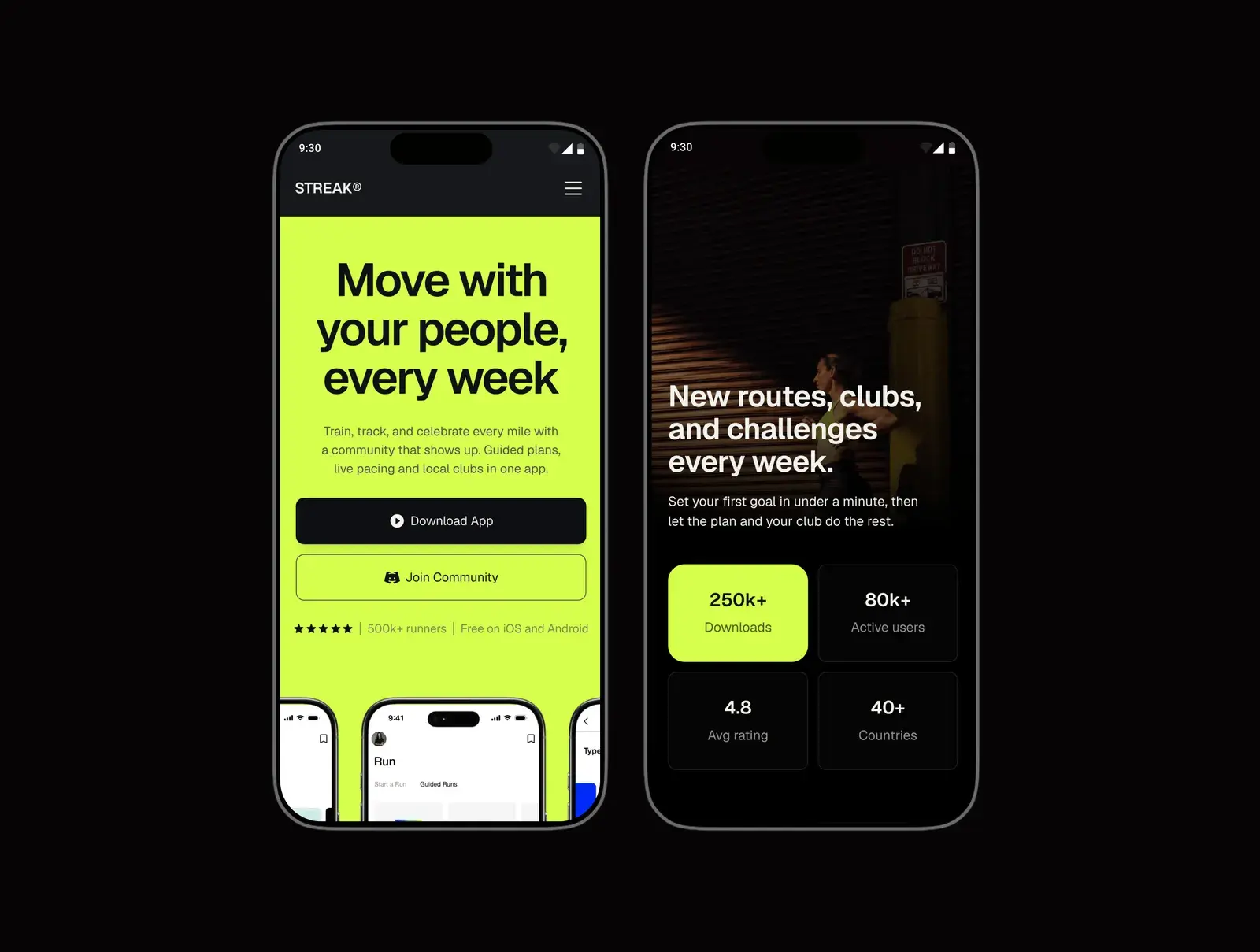
The best free Framer template for a mobile app's full site is Recents: release notes, a support centre, a press kit, pricing and one download link that sends each phone to its own store. For an app between TestFlight and the App Store, Streaks has a changelog, a press page and the privacy and terms pages the stores ask for. For a single landing page, Upplix is free, and for an app that is not out yet, Newcomer collects a waitlist.
| Template | Best for | Price | Pages | CMS | Theme | Link |
|---|---|---|---|---|---|---|
| Recents | A full app site, free | Free | 19 | Eight collections | Light and dark | Get it |
| Streaks | An app between TestFlight and the App Store | Free | 7 | Changelog, testimonials, FAQ, features | Light and dark | Get it |
| Handset | An app with paid plans and frequent releases | $39 | 10 | Seven collections | Light and dark | Get it |
| Upplix | A one-page landing | Free | 3 | None found | Light | Get it |
| Newcomer | An app that is not out yet | Free | 5 | Updates, plus one more | Light | Get it |
| NEARLY | A consumer app with a cinematic story | $79 | 9 | None found | Light | Get it |
| Habitline | A light, free site with FAQ and contact pages | Free | 10 | None I could confirm | Light | Get it |
Checked November 2026.
The short version
- A full app site for free: Recents, with release notes, a support centre, a press kit and one link for both stores.
- An app between TestFlight and the App Store: Streaks (free), with a changelog, a press page and privacy and terms. Handset ($39) adds pricing and a download button that picks the store.
- One page: Upplix, free. An app that is not out yet: Newcomer, free, with a waitlist and build notes.
- Apple and Google both ask for a privacy policy URL, and none of the seven ships the official store badges, so add those yourself.
How I picked these
I read the 64 listings the Framer Marketplace shows in its Apps category, plus about 20 more from searches for mobile app, app landing, iOS app and app. I loaded 48 live previews at desktop and phone width with their sitemaps, then went through 18 of them page by page on 3 November 2026, following every download button to see where it went. Page counts include each CMS layout once and the 404 where there is one, as I count my own.
- Built for an app. A clear line on what it does, the phone on screen, and a way to the stores.
- What the stores ask for. A privacy page at least, and a way to reach you.
- Phone layouts. All 48 stacked to one column with no sideways scrolling at phone width.
- Easy to edit. Shared styles, and release notes or FAQs on the CMS where they repeat.
- Recently maintained. Every pick was published or updated in 2026.
I make and sell Framer templates on Openfile, and one of mine is on this list. I've tried to be fair; the others are here because they're good.
Recents: best for a full app site, free
Recents is the most complete app site I found, and it is free. The sample app, a daily budget called Groat, has a page for everything people look for after they hear about an app: what each screen does, what it costs, what changed in each release, how to get help, and a press kit with the facts a writer needs.
- Price: Free
- Pages: 19 (the listing's count): home and a second home, features and a page per feature, pricing, about, journal and post, releases and release notes, support and guide, contact, press kit, coming soon, get, legal, 404 and a style guide
- CMS: Yes, eight collections: screens, reviews, questions, releases, guides, team, legal and journal
- Notable sections: a deck of the app's five screens, release notes with a page each, six support guides, a press kit, a plan comparison table, a Coming soon page with a countdown, a scan code for phones
Good
- One link serves both stores. The Get page sends an iPhone to the App Store and an Android phone to Google Play, and offers both with a scan code on a computer.
- Light and dark are both finished, with a switch that remembers the visitor's choice. Each screenshot has a second slot for the app's own dark theme.
- The Coming soon page means the same site works before launch and after.
Watch out for
- Eight collections means Framer Pro for your own domain, $30 a month billed yearly. Basic allows two.
- It was published on 14 October 2026, so it has no history of updates yet.
- Nine code components run the screen deck, the theme switch and the store link. They have plain controls, but they are more to learn than native layers.
Streaks: best for an app between TestFlight and the App Store
Streaks is mine. It is for the weeks around launch, when testers want to know what changed and the stores want a privacy policy. The sample app is for runners who train in clubs, and the home page carries an announcement ticker, a marquee of app screens, the features, how it works, stories, stats, an FAQ and a download block.
- Price: Free
- Pages: 7: home, changelog, changelog entry, press, privacy, terms and a 404
- CMS: Yes: changelog (seven entries), testimonials, FAQ and features
- Notable sections: announcement ticker, device marquee, feature grid, how it works, testimonials, stats, FAQ, store download block, press boilerplate
Good
- Each release has a version number, a tag (feature, improvement or fix), a date and a page of its own, so testers can follow along.
- The press page has a short and a long description and a contact email, ready for launch week.
- Light and dark themes share one set of colour styles, so a re-theme is one pass.
Watch out for
- The store buttons are plain stand-ins on purpose. Add Apple's and Google's official badges before launch.
- No email signup, no pricing page and no contact form, only an email address. For a waitlist first, see Newcomer below.
- Four collections means Framer Pro for your own domain.
Handset: best for an app with paid plans and frequent releases
Handset is built around the download button. On an iPhone it opens the App Store, on Android Google Play, and on a computer it shows a QR code to scan. The sample app, a habit tracker called Pace, also has a pricing page with a monthly and yearly toggle and a changelog that ships every few weeks.
- Price: $39
- Pages: 10: home, features, pricing, changelog, release page, blog, post, privacy, terms and a 404
- CMS: Yes, seven collections: features, plans, testimonials, FAQ, changelog, blog posts and comments
- Notable sections: store button that detects the device, a phone frame for iPhone and Android, pricing from the CMS, changelog with version tags, FAQ
Good
- The pricing page says subscriptions are handled by the App Store and Google Play, which is how most app plans are sold.
- Light and dark, with a toggle that remembers the choice, and a read-me page inside the project.
Watch out for
- It was published on 30 October 2026, four days before I checked it.
- Seven collections means Framer Pro for your own domain. The licence covers one website.
- The sample prices are in euros, and the download links point at the stores' home pages until you add your own.
Upplix: best for a one-page landing, free
Upplix is one long page that does the usual job well: a phone in the hero, App Store and Google Play buttons above it, then benefits, features, testimonials, pricing and an FAQ. Privacy and terms are separate pages, already written out.
- Price: Free
- Pages: 3: home, privacy and terms
- CMS: None found
- Notable sections: phone mockup hero, store buttons, feature blocks, testimonials, pricing, FAQ
Good
- Everything a visitor needs is on one scroll, and the store buttons repeat at the end.
- No collections, so it fits Framer's Basic plan with room to spare.
Watch out for
- No contact page or form. The support email appears only on the legal pages, so add one to the footer.
- The store buttons are drawn in the template, not Apple's or Google's badge artwork. Swap them for the official ones.
- No changelog. Once you ship updates, you'll want a page for them.
Newcomer: best for an app that is not out yet
Newcomer is a waitlist site for an app that is built but not shipped. The signup sits in the hero and again at the bottom, phone mockups show the screens, and an updates page lists each build with its number and date, so the people on the list can watch it come together.
- Price: Free
- Pages: 5: home, updates, update page, privacy and a 404
- CMS: Yes, two collections, one of them the updates
- Notable sections: waitlist signup twice, phone mockups, a row of the apps it connects to, build notes, tweet-style testimonials
Good
- Build notes are a reason to stay on the list for months, and they turn into release notes after launch.
- Two collections, which is exactly what Framer's Basic plan allows.
- Felix Clausen updated it on 27 September 2026, and the project includes a setup guide and a pre-launch checklist.
Watch out for
- No store links, by design. Add a download section on launch day.
- A privacy page but no terms page.
NEARLY: best for a consumer app with a cinematic story
NEARLY tells its app's story on scroll: a 3D phone opens into short films of the app in use, then returns to the interface. It is white with cobalt details, and around the home page sit the pages a consumer app needs: the app, plans, download, help, contact, privacy and terms.
- Price: $79
- Pages: 9: home, the app, plans, download, help, contact, privacy, terms and a 404
- CMS: None found
- Notable sections: 3D phone with three looping films, three floating phones with editable screens, plans, a help page of questions, download page for iOS and Android
Good
- The help page answers the questions a new user asks, in the app's own voice.
- The listing says the films have photo fallbacks and the motion has reduced-motion fallbacks.
Watch out for
- The dearest pick here, and published on 27 October 2026.
- The contact form only checks and confirms on the page. Connect a form service before you rely on it.
- The home page is long on a phone, about 20,900 pixels with three films, so check how it loads on a slow connection.
Habitline: best for a light, free site with FAQ and contact pages
Habitline is warm and light, built around a habit app, with the supporting pages many free app templates skip: about, FAQs, contact with a form and two email addresses, a waitlist page, privacy and terms. It also has a second, simpler home page to choose from.
- Price: Free
- Pages: 10 by my count, with the 404: two home pages, about, FAQs, contact, changelog, waitlist, privacy and terms (the listing says 9)
- CMS: None I could confirm
- Notable sections: use cases, metrics, AI suggestions, FAQ page, contact form, waitlist page, newsletter signup, App Store and Google Play icons in the header
Good
- A waitlist page and store icons side by side, so it works before and after launch.
- Salim from Webestica updated it on 12 October 2026, and the listing includes the Figma file.
Watch out for
- The changelog page lists the template's own versions, not the app's. Rewrite it before you publish.
- Most pages share the template's browser title. Set a title and description for each page.
What an app's site needs
An app's site has two readers: people deciding whether to download, and the stores, which want a few links before they publish you. Here is the list I'd hold any template against, and which picks show each item in their preview. A missing name means I didn't see it, not that you can't add it.
| What it needs | Why | Picks that have it |
|---|---|---|
| Store links with the official badges | Apple and Google ask you to use their own badge artwork, unchanged | Store links: Recents, Streaks, Handset, Upplix, NEARLY, Habitline. I didn't see the official artwork in any of them |
| Screenshots or a device frame | People want to see the app before they download it | Recents, Streaks, Handset, Upplix, Newcomer, NEARLY |
| What it does, in one line | The first screen decides the visit | All seven |
| A privacy policy and terms | Both stores ask for a privacy policy URL | Both: Recents, Streaks, Handset, Upplix, NEARLY, Habitline. Privacy only: Newcomer |
| Support or contact | Apple asks that your Support URL has an easy way to reach you | Support guides: Recents. Help page: NEARLY. Contact form: Recents, NEARLY, Habitline. Email only: Streaks, Handset, Newcomer |
| A changelog or what's new | Testers and users check what changed | Recents, Streaks, Handset, Newcomer |
| A press kit | A writer can cover you without an email | Recents, Streaks |
| A waitlist before launch | It keeps the people who found you early | Newcomer, Habitline. A Coming soon page: Recents |
The privacy rows are not optional. Apple's App Store Review Guidelines say all apps must link to a privacy policy in App Store Connect and inside the app, and Google Play asks every app for a privacy policy link in the Play Console, even apps that collect no personal data, on a public web page rather than a PDF. A page on your own site is the simplest place for it. Apple's badge comes from its App Store marketing guidelines and Google's from its Partner Marketing Hub, and both say not to change them.
How to choose
- A full site, no budget: Recents, on Framer Pro.
- Testers now, the stores soon: Streaks for release notes and a press page, or Handset if you sell plans in the app.
- One page: Upplix.
- Not out yet: Newcomer, which keeps its build notes after launch. If you have no screens to show yet, my free Launchlist is one page with an email field and nothing else.
- A consumer app that wants to feel like a film: NEARLY.
- A light site with FAQ and contact pages, free: Habitline.
Waitlist page or full launch site covers how much site you need at each stage, and the product launch templates are in one place.
What to change first
- Replace the sample screens with your own, in light and dark if the template has both.
- Put your real App Store and Google Play links behind the official badges, and test them on an iPhone and an Android phone.
- Rewrite the privacy policy and terms for your app, then paste the privacy URL into App Store Connect and the Play Console.
- Clear the sample changelog, reviews and download numbers. A new app with 500,000 downloads reads as fake.
Checking breakpoints before you publish has the phone checks, which matter more than usual when most visitors arrive on the phone they would install the app on.
Questions people ask
Does my app's website need a privacy policy?
Yes, if the app is on the App Store or Google Play. Apple's guidelines say all apps must link to a privacy policy in App Store Connect and inside the app, and Google Play asks every app for one in the Play Console, even apps that collect no personal data. A page on your site is the usual place. All seven templates here include a privacy page.
Can I put the App Store and Google Play badges on my site?
Yes, using the official artwork. Apple's badge is for apps available on the App Store and comes from its marketing guidelines page; Google's comes from its Partner Marketing Hub. Neither may be recoloured or redrawn. None of the seven templates here ships the official badges, so download them and swap them in.
Can a Framer site send iPhones to the App Store and Android phones to Google Play?
Yes. Recents has a Get page that does it, and Handset has a store button that detects the device and shows a QR code on a computer. I saw both in the previews but did not test them on real phones.
Which Framer plan do I need for an app site?
Basic, at $10 a month billed yearly, covers 30 pages and two CMS collections, which fits Upplix, Newcomer and most one-page sites. Streaks has four collections, Handset seven and Recents eight, so your own domain needs Pro at $30 a month billed yearly.
Is one landing page enough for an app?
At first, usually. Add a privacy page and a way to contact you, since the stores ask for both, and a changelog once you ship updates. Upplix is a free one-page start; Streaks and Recents add the pages for later.